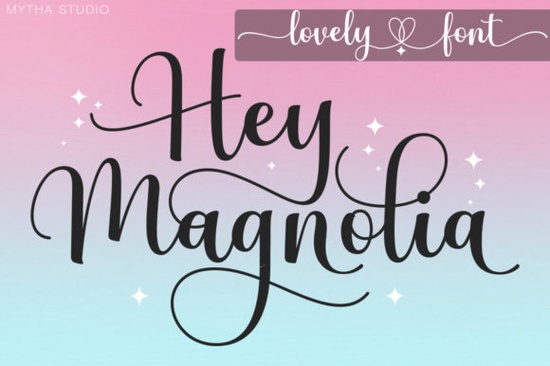
When you need a handwritten typeface that balances playful curves with clean readability, the Hey Magnolia Font is a reliable choice for both screen and print projects. It was built specifically for makers who want their lettering to look hand-drawn without sacrificing the precision needed for professional layouts. Because it supports standard font software and popular cutting machines, you can drop it straight into your workflow and start experimenting with alternate characters right away. Whether you are building a new brand identity or updating seasonal packaging, this script gives you a polished foundation without requiring advanced typography training.
How does PUA encoding actually save time in your daily workflow?
Private Use Area encoding means every decorative alternate, swash, and ligature is mapped directly to a standard keyboard character or a simple shortcut. Instead of opening a separate glyph panel and manually copying symbols, you can type your text, apply the style, and swap out individual letters using your software’s character map. This setup removes the guesswork that often slows down branding projects, wedding invitations, and product labels. Designers who work quickly with tight deadlines prefer typefaces that handle swashes this way because it keeps the file size manageable while preserving full creative control over spacing and kerning.
What kinds of projects benefit most from this handwritten style?
The soft, flowing strokes work best when you need to add a human touch to otherwise rigid layouts. Small business owners frequently use it for logo wordmarks, thank-you cards, and social media graphics that need to feel approachable. Print-on-demand sellers apply it to tote bags, mugs, and apparel where the text becomes the main visual focus. Crafters also pair it with botanical elements and watercolor textures for scrapbooking pages, digital planners, and local event signage. If your goal is to make a layout feel personal and warm, this typeface provides that balance without crossing into overly messy territory. You can review how similar layouts handle character spacing by visiting the botanical typography gallery for layout ideas.
Can beginners use it in Cricut Design Space without trouble?
Yes, because the file is packaged for standard desktop use and fully compatible with popular cutting software. The creators even include it in a beginner course called Introduction to Cricut Design Space, which walks you through importing files, tracing paths, and adjusting letter spacing before you hit the cut button. New users often struggle with script alignment, but having clear access to alternate glyphs means you can quickly fix overlapping letters or awkward gaps. Many hobbyists also reference the romantic typography collection when planning custom cardstock prints. Once installed, the font behaves like any other system typeface, so you can layer it with bold sans-serif headers for better visual contrast.
Which similar script styles pair well for layered compositions?
Handwritten fonts rarely work best alone. Mixing two or three complementary scripts creates visual rhythm, especially when one handles headings and another adds decorative accents. If you enjoy the same organic feel, you might explore Honeymoon Handwriting Font for a slightly tighter loop structure. For softer, romantic layouts, the Flower Honey Font offers a gentler baseline. Those who want something bolder for short phrases often try the I Heart You Font, while coastal or summer themes pair naturally with the Coconut Bay Font. For additional layout inspiration, browsing through the handwritten archive can help you visualize how different weights interact before you commit to a final design, while the summer design examples show how to balance heavy and light strokes on merchandise.
Where can you compare different typefaces before downloading?
If you want to test how different letterforms behave in your favorite design software, you can review sample layouts using the official Hey Magnolia Font preview page. Checking how the baseline and x-height match your existing composition prevents resizing headaches later and ensures your final export prints sharply on vinyl, paper, or fabric.
Before adding this typeface to your next project, run through a quick setup routine:
- Install the desktop file using your operating system’s default font manager.
- Open a fresh document and type a short test phrase to check default spacing and line height.
- Apply alternate swashes only to capital letters to create natural entry points for the script flow.
- Pair the handwritten text with a simple geometric sans-serif at least two sizes smaller to maintain readability.
- Export your design as a PNG with a transparent background for smooth Cricut or Silhouette cutting.
- Keep the original layered source file untouched so you can swap individual glyphs without rebuilding the layout.
 Aureline Font: a Creative and Versatile Typeface
 Creative Uses for a Sometimes Font in Design Projects
 Floral & Honey Font for Sweet Designs
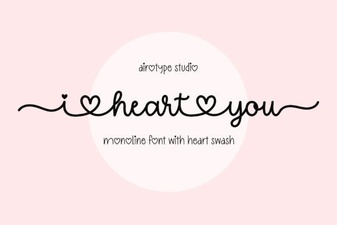 Download Your Favorite I Heart You Font
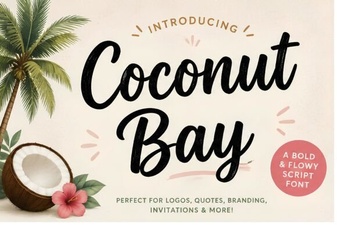 Coconut Bay Font: Tropical Typography for Vibrant Designs
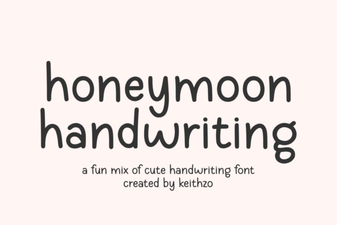 Honeymoon Handwriting Font for Creative Projects